A payment reminder message works best when it names the invoice, amount and due date, then gives the client one simple way to pay. Use the 12 templates below for WhatsApp or email, moving from a friendly nudge to a clear final notice without making the conversation personal.
When to send each reminder
The right timing depends on your agreed payment terms and the client relationship. A simple sequence keeps you consistent: mention the upcoming due date first, follow up on the due date, then ask for a payment date if the invoice is overdue.
| Stage | When to send | Tone | Main purpose |
|---|---|---|---|
| Heads-up | A few days before the due date | Helpful | Put the invoice on the client’s radar |
| Due today | On the due date | Short and neutral | Make payment details easy to find |
| First overdue follow-up | After the due date | Polite and direct | Confirm the invoice was received |
| Firm follow-up | After your agreed grace period | Clear and specific | Ask for a payment date |
| Final notice | After further follow-up | Professional and factual | State the date by which you need an update |
Do not send every message in one day. Leave enough time for the client to check with accounts, find the invoice or raise a genuine question. If they have already paid, ask them to ignore the reminder and send the transaction reference if you need to match it.
What to include in a payment reminder message
Before copying a template, replace every bracketed field. A useful reminder usually contains:
- The client’s name and your name or business name.
- The invoice number or a short description of the work.
- The exact amount and due date.
- One payment route, such as the UPI QR on the invoice or your business UPI ID.
- A simple reply option if something is blocking payment.
Keep the message about one invoice. Do not paste several unrelated balances into a WhatsApp chat, because the client may not know which amount you want them to clear first. For email, put the invoice number and amount in the subject so the request is easy to find later.
Polite first reminder templates
These templates work before the due date or for the first follow-up. They are deliberately short: the invoice should carry the detailed description, tax information and payment instructions.
1. Friendly WhatsApp reminder before the due date
Hi [Name], a quick reminder that invoice [Invoice number] for [service/project] — ₹[Amount] — is due on [Due date]. I’ve attached the invoice with the UPI QR for payment. Please let me know if you need anything from my side. Thank you, [Your name]2. Due-date WhatsApp reminder
Hi [Name], invoice [Invoice number] for ₹[Amount] is due today. You can pay using the UPI QR on the invoice. Once paid, please reply here with the transaction reference so I can update my records. Thanks, [Your name]3. Polite payment reminder email
Subject: Payment due today: Invoice [Invoice number] for ₹[Amount]
Hi [Name],

This is a gentle reminder that invoice [Invoice number] for [service/project], amount ₹[Amount], is due today, [Due date]. The invoice is attached and includes the UPI QR for payment.

Please reply if you have any questions about the invoice. If payment has already been made, you can ignore this email and share the transaction reference when convenient.

Regards,
[Your name]
[Business name]
4. Reminder when the client may have missed the invoice
Hi [Name], I’m checking that invoice [Invoice number] for ₹[Amount] reached you. It was sent for [service/project] and is due on [Due date]. I’m sharing the invoice with its UPI QR again here. Please tell me if you need a revised copy or any information to process it.Firm follow-up templates
Use a firmer message when the due date has passed and you have already sent a polite reminder. Be specific about the invoice and ask for a date rather than writing “please pay soon”. That gives the client an easy question to answer.
5. First overdue WhatsApp follow-up
Hi [Name], following up on invoice [Invoice number] for ₹[Amount], which was due on [Due date]. Could you please confirm when the payment is scheduled? The UPI QR is on the attached invoice. If there is an issue with the invoice, reply here and I’ll check it.6. Seven-day overdue email
Subject: Follow-up required: Invoice [Invoice number] overdue by [Number] days
Hi [Name],

I’m following up on invoice [Invoice number] for ₹[Amount], issued for [service/project]. The due date was [Due date], and the payment is now [Number] days overdue.

Could you please confirm the expected payment date? I’ve attached the invoice again with the UPI QR. If your accounts team needs a document or correction, please tell me what is required.

Regards,
[Your name]
7. Reminder to a company accounts team
Hello [Accounts contact], please share the payment status for invoice [Invoice number] of ₹[Amount], due on [Due date], for [service/project]. If the invoice is waiting for a PO, approval or another document, please let me know. The attached copy includes the UPI QR for payment. Kindly confirm the expected payment date.8. Short payment-due reminder with a clear reply
Hi [Name], ₹[Amount] for invoice [Invoice number] was due on [Due date] and is still pending in my records. Please reply with the planned payment date, or tell me if there is a question about the invoice. Payment details are on the attached invoice. Thanks, [Your name]Final notice templates
A final notice should stay factual. Refer to the invoice and the payment terms you agreed, give a specific date for the next update, and avoid adding a late fee or service consequence unless it is already part of your written agreement and you are prepared to apply it.
9. Final WhatsApp notice
Hi [Name], this is a final reminder for invoice [Invoice number] of ₹[Amount], due on [Due date]. Please arrange payment by [Requested date] using the UPI QR on the attached invoice, or reply today with the date it will be paid. If there is a dispute or missing document, please let me know so I can address it.10. Final notice email
Subject: Final payment reminder: Invoice [Invoice number] for ₹[Amount]
Hi [Name],

This is a final payment reminder for invoice [Invoice number] for ₹[Amount], issued on [Invoice date] and due on [Due date]. The invoice relates to [service/project] and remains unpaid in my records.

Please complete payment by [Requested date] using the UPI QR on the attached invoice, or reply with the confirmed payment date. If you believe the amount or invoice details are incorrect, please send the specific question today.

Regards,
[Your name]
[Business name]
11. Final reminder before pausing new work
Hi [Name], invoice [Invoice number] for ₹[Amount] is overdue from [Due date]. Please clear it by [Requested date] or reply with a payment date. As set out in our agreement, I’ll review the schedule for new work after that date. The attached invoice has the UPI QR. Please tell me today if anything is blocking payment.Only use the work-pause sentence when it matches the agreement you made with the client. If there is no such term, remove that sentence and keep the rest of the reminder.
12. Final accounts-team escalation
Hello [Name], I’m requesting an update on invoice [Invoice number] for ₹[Amount], due on [Due date]. I have followed up previously, but the payment is still pending in my records. Please confirm the payment date by [Requested date], or connect me with the person handling this invoice. The attached copy includes the UPI QR and invoice details. Regards, [Your name]Attach an invoice with a UPI QR
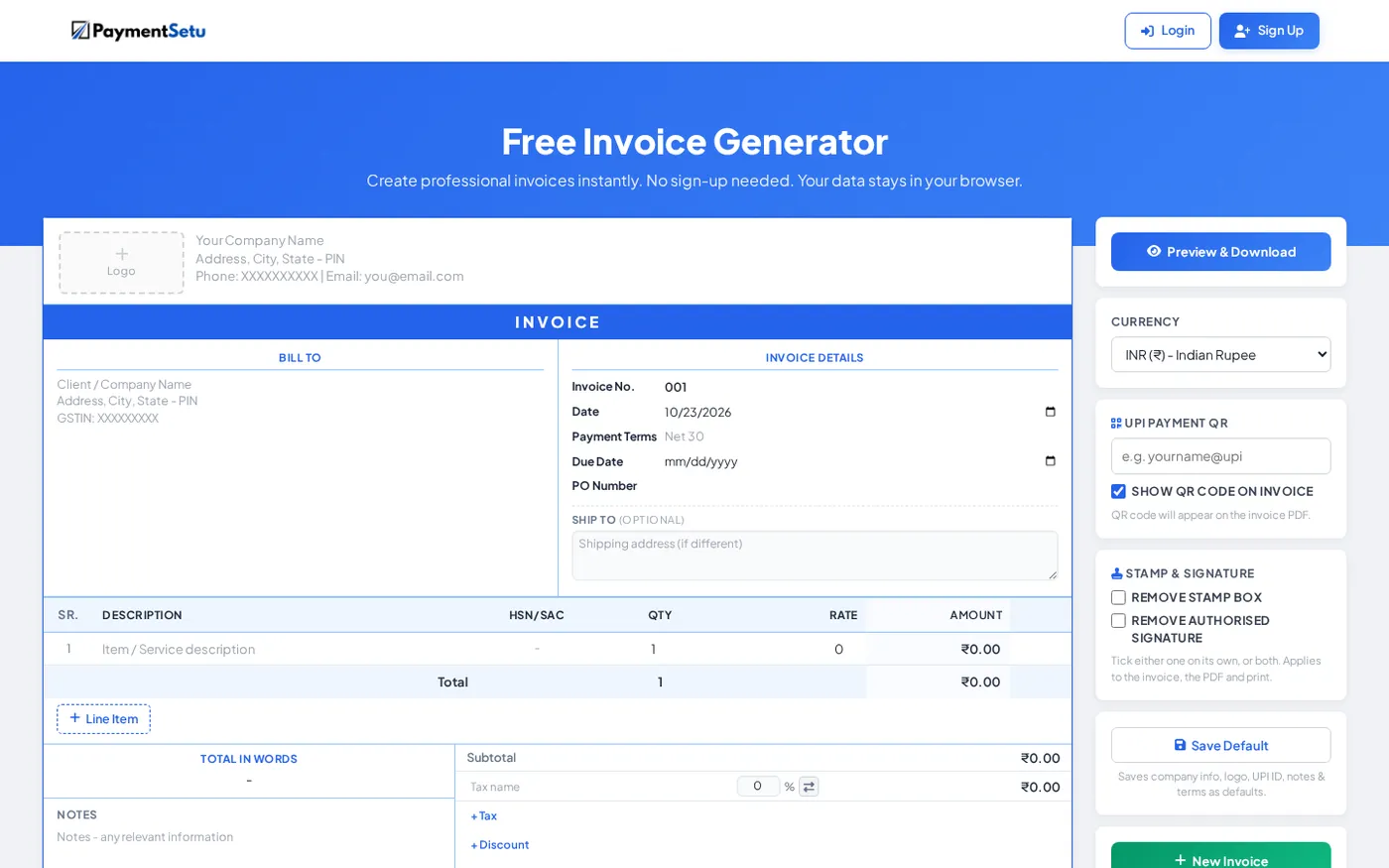
A reminder is easier to act on when the client does not have to search an old chat for payment details. Create one invoice with the client name, invoice number, amount, due date, your business details and a UPI QR, then attach the same PDF when you send the reminder.
PaymentSetu’s free invoice generator with UPI QR can create a downloadable invoice with a UPI QR, HSN/SAC, tax, discount and shipping fields. It works in the browser without sign-up, so it is a practical starting point for a freelancer, coach, consultant or small shop sending occasional invoices.
Use one payment route in the message. If you include both a UPI ID and a separate link, the client may not know which one to use and you may have to reconcile two references. For a counter, stall or simple printed payment instruction, you can also make a free UPI QR code and print it with your payment details.
Check the payee name and amount before sending. NPCI’s UPI FAQ explains that a QR can carry the merchant information and amount for the payment screen. The customer should confirm those details in their UPI app before authorising the transaction.
Never ask the client to send a UPI PIN, OTP, card PIN or password in a message. NPCI’s fraud-awareness guidance says that scanning a QR code and entering a UPI PIN is for making a payment, not receiving one. Your reminder needs payment instructions only; it should never request authentication secrets.
Auto-confirm when they pay
A reminder and a payment confirmation are two separate steps. Ask the client to reply with the transaction reference, but verify the credit in your own merchant account before marking the invoice paid. A screenshot can be useful for matching, but it is not the same as checking the actual credit.
If you sell online or issue a high number of invoices, manual matching can become a separate task. PaymentSetu is a payment verification service: the customer pays your own Paytm Business or PhonePe Business merchant account, PaymentSetu matches the UTR and amount to the dynamic QR or order, and it sends a webhook to your system. It does not hold the money.
For a WooCommerce store, see the PaymentSetu WooCommerce plugin. For a hosting business using WHMCS, the WHMCS gateway module can fit an invoice-based workflow. If you build your own billing screen, the service also provides API access and HMAC-signed webhooks for payment status updates.
After you confirm payment, send a short acknowledgement:
Hi [Name], payment of ₹[Amount] for invoice [Invoice number] has been received. Thank you. I’ve updated the invoice status. Regards, [Your name]If you send a large volume of email, follow your email provider’s delivery requirements. Gmail’s Email sender guidelines cover authentication and sending practices; for a small manual reminder, the more important habit is to use a real sender name, a clear subject and a message that relates to the invoice.
How to choose the right template
Start with the least forceful message that fits the situation. A client who is one day late needs a clear reminder; a client who has ignored several messages needs a deadline and a request for a specific response.
- Before the due date: use Template 1 or 4 and make the invoice easy to open.
- Due today: use Template 2 or 3. Keep the request short.
- A few days overdue: use Template 5 or 6 and ask for a payment date.
- Accounts-team delay: use Template 7 or 12 and ask what is needed for approval.
- Repeated silence: use Template 9 or 10 and set a reasonable response date.
- A contract already covers the next step: use Template 11, keeping only the sentence that matches your agreement.
Before pressing send, remove empty brackets, check the amount, confirm the UPI details, attach the correct invoice and make sure the requested date is realistic. A professional reminder is specific enough to act on and calm enough to preserve the working relationship.
FAQ
What should a payment reminder message include?
Include the client’s name, invoice number, amount, due date and one clear way to pay. Add a reply option for questions, and ask the client to ignore the reminder if payment has already been made.
How do I politely remind a client to pay on WhatsApp?
State the invoice details in one or two short paragraphs and avoid apologising for following up. A line such as “Could you please confirm the expected payment date?” is polite, direct and easy to answer.
Can I include a UPI QR code in an invoice?
Yes, you can create an invoice that includes a UPI QR and attach it to the reminder. Ask the payer to check the displayed payee and amount in their UPI app before authorising payment, and never ask for their UPI PIN or OTP.
What should I do if the client says they have paid?
Check your own merchant account and match the amount, invoice and transaction reference before marking the invoice paid. If you use a payment-verification workflow, let the verified payment status update the order or invoice, then send a receipt or acknowledgement.
When should I send a final payment reminder?
Send it after your earlier reminders and any grace period in your agreement have passed. Name the invoice, state the amount and due date, give a specific date for payment or a response, and mention only next steps that you have already agreed with the client.