

The HSN code full form is Harmonised System of Nomenclature, a classification system used for goods under GST, while SAC means Services Accounting Code and is used for services. The practical rule is simple: put HSN against a product line and SAC against a service line, then use the required number of digits for your invoice and business category.
HSN and SAC full forms
HSN and SAC are classification codes. They make the nature of a supply clear on an invoice and help connect the line item to the relevant GST rate and reporting category.
| Code | Full form | Used for | Simple example |
|---|---|---|---|
| HSN | Harmonised System of Nomenclature | Physical goods | A shirt, laptop or packaged food item |
| SAC | Services Accounting Code | Services | Web development, bookkeeping or hosting |
HSN follows a hierarchy. The first two digits identify a broad chapter, four digits identify a heading, six digits identify a sub-heading and eight digits can identify a more specific Indian tariff item. The first six digits are based on the international Harmonised System, while India uses the Customs Tariff for further detail.
SAC codes are listed in the CBIC Scheme of Classification of Services. The scheme places services in Chapter 99 and uses six-digit service codes. For example, 998314 is listed for information technology design and development services, while 998222 is listed for accounting and bookkeeping services. These are examples of classification, not a reason to copy a code without checking that it describes your actual supply.
Goods use HSN, services use SAC
Choose the code based on what you are supplying, not on the way the customer pays. A UPI payment, card payment or bank transfer does not change a product into a service or a service into a product.
For example, a retailer selling a physical laptop records the relevant HSN for that product. A freelancer charging for website development records the relevant SAC for the development service. A hosting company should look up the code that matches the hosting service it supplies, rather than using the HSN of the server hardware.
If an invoice contains both goods and services, treat each line according to its supply. The invoice may therefore show an HSN on one line and a SAC on another. Write a clear description beside each code so that the classification can be checked later.
The CBIC tax invoice rules list “HSN code of goods or Accounting Code of services” among the particulars of a tax invoice. The same page also lists the description, quantity where applicable, taxable value, tax rate, tax amount and place of supply requirements.
How many digits should you show?
The number of digits is not one universal answer for every taxpayer and every invoice. The broad GSTN guidance from 1 April 2021 uses the following turnover-based levels for HSN/SAC reporting:
| Aggregate turnover in the preceding financial year | Minimum level in the GSTN guidance |
|---|---|
| Up to ₹5 crore | 4 digits |
| Above ₹5 crore | 6 digits |
The CBIC press release describes the up-to-₹5-crore requirement specifically for B2B invoices. It also explains the six-digit requirement for taxpayers above ₹5 crore and notes that HSN codes can continue to the eight-digit tariff-item level. Because invoice type, exports, e-invoicing and later notifications can affect the field you need to report, check the current requirement that applies to your case before issuing a tax invoice.
Two details prevent common mistakes:
- Use a valid code from the GST search or the applicable tariff/classification list. Do not invent a shorter code by chopping digits off a longer code.
- If a valid classification exists at a longer level and your return or invoice requires that level, retain the complete valid code rather than adding or removing zeros by guesswork.
The GSTN advisory on HSN and GSTR-1 specifically warns that truncating the first six digits from an eight-digit HSN can create an invalid code. The GST portal HSN/SAC search is the right starting point for checking the description and available code.
How to find the right HSN or SAC code
Do not start with a random internet list. Start with the exact description of the item or service and narrow it down until the official description matches what you supply.
For goods
- Write down what the product is, what it is made of and its main use.
- Search the product description in the GST portal’s HSN/SAC search.
- Compare the returned description with the actual product, including material, form and intended use where those distinctions matter.
- Check the required digit level for your turnover and invoice type.
- Save the code and description with your item master so the same product is invoiced consistently.
For services
- Describe the service by the work delivered, not by a vague label such as “professional charges”.
- Search the GST portal using a service description.
- Compare the result with the CBIC Scheme of Classification of Services.
- Select the specific service code that best describes the work. For example, the CBIC scheme separates IT consulting and support from IT design and development.
- Keep the service description and SAC together in your invoice template.
If two codes look similar, read their official descriptions and compare the actual scope of work. The code is not selected merely because it produces a preferred tax rate. Classification should describe the supply being invoiced.
Where to put HSN or SAC on an invoice
The clearest place is the line-item table, next to the description. A useful layout is:
| Item description | HSN/SAC | Quantity | Rate | Taxable value | GST |
|---|---|---|---|---|---|
| Website design and development | SAC: 998314 | 1 | ₹25,000 | ₹25,000 | As applicable |
| Printed product brochure | HSN: search the exact product | 100 | ₹80 | ₹8,000 | As applicable |
Do not put one generic code in the invoice header when the invoice contains different products or services. Put the relevant classification beside the relevant line. Also make sure the invoice includes the other required information, such as the supplier’s GSTIN, invoice number and date, recipient details, taxable value, tax rate and tax amount where applicable.
The code does not replace the description. “998314” alone is less useful than “Website design and development — SAC 998314”. A clear description helps the customer, your bookkeeper and future reconciliation.
Worked invoice example with HSN/SAC
Imagine a small web studio raises an invoice for a customer. The studio supplies one service: website design and development for ₹25,000. In the item table, it can show the service description, the applicable SAC selected from the official classification, quantity 1, the taxable value and the applicable GST calculation.
The important point is the relationship between the fields:
Website design and developmentis the description.998314is the SAC example listed in the CBIC service classification for IT design and development services.₹25,000is the taxable value in this example.- The applicable GST rate and tax amount are separate invoice fields; the code is not a substitute for checking the rate that applies to the supply.
- The invoice can include a UPI QR so the customer can pay using the payment details shown by the supplier.
For a product invoice, replace the SAC with the valid HSN for each product line. If the buyer needs a B2B tax invoice, include the buyer’s GSTIN and follow the applicable digit requirement. If you are unsure whether a supply is goods, services or a mixed supply, resolve that classification before finalising the invoice rather than forcing it into the nearest-looking code.
Create a free invoice with HSN/SAC and a UPI QR
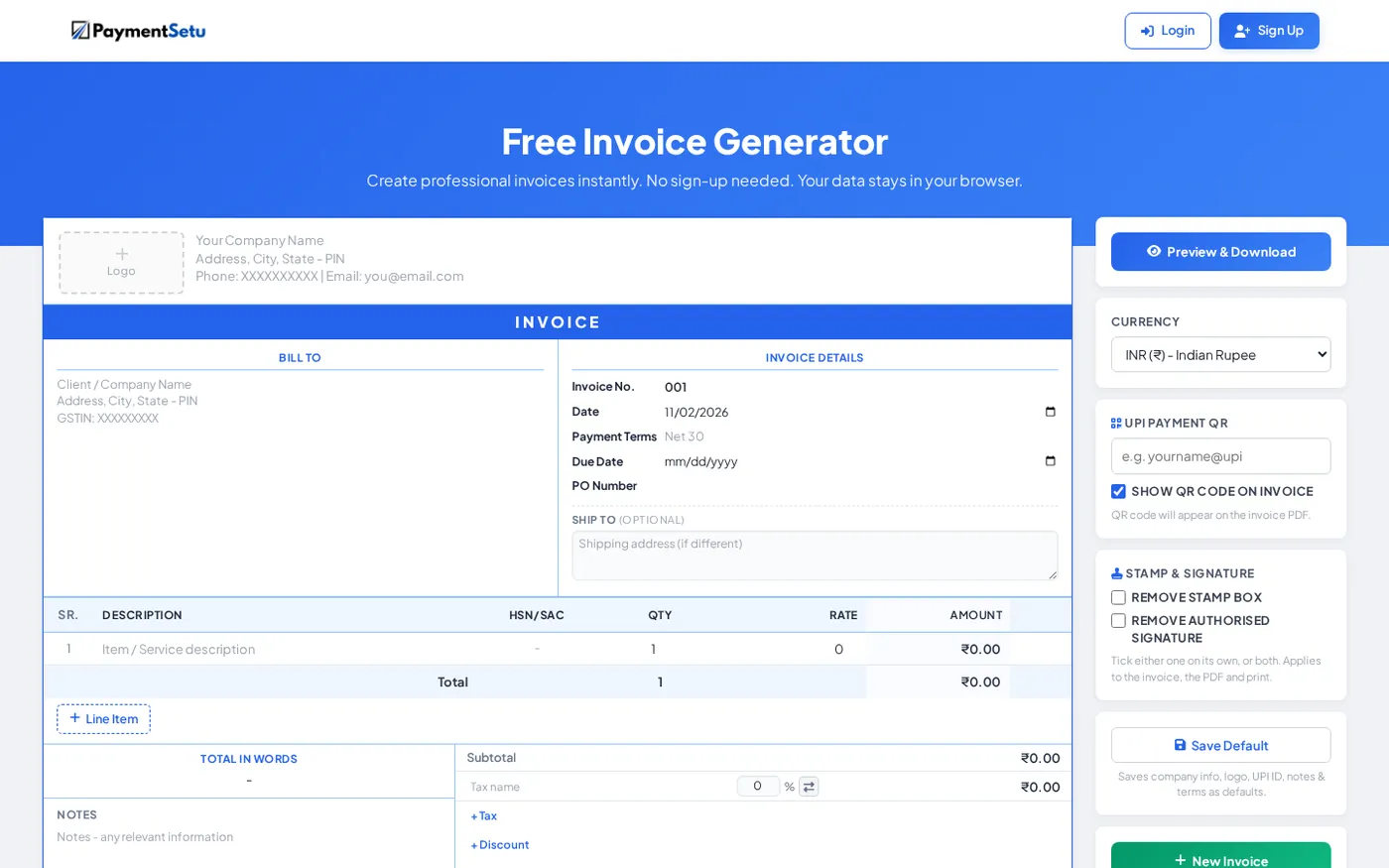
PaymentSetu’s free invoice generator includes fields for HSN/SAC, tax, discount and shipping, and can add a UPI QR to the invoice. It also supports PDF download and keeps the entered data in the browser.
To make a practical invoice:
- Open the generator and enter your business and customer details.
- Add each product or service as its own line.
- Select or enter the HSN for goods or SAC for services after checking the official description.
- Add quantity, price, discount, shipping and the applicable tax details.
- Add the payment UPI ID so the invoice QR points to the intended recipient.
- Preview the line-item table, verify the code and description, then download the PDF.
The QR is a payment convenience; it does not determine the GST classification. If you also want a standalone counter or WhatsApp QR, you can use the free UPI QR code generator. For a wider walkthrough of invoice-plus-QR workflows, see Invoice With UPI QR: Free PDF Setup Guide.
After the customer pays, keep the payment reference with the invoice record so you can reconcile it later. The guide What Is a UTR Number in UPI? explains where that reference is usually found.
Common HSN and SAC mistakes
Using HSN for a service
HSN is for goods. If you invoice web development, consulting, accounting, hosting or another service, look for the relevant SAC instead.
Using one code for every line
Different goods can have different HSNs, and different services can have different SACs. A generic code copied across the entire invoice can make the line-item record misleading.
Guessing from the GST rate
The rate is not a reliable shortcut to the classification. Start with the nature of the supply, confirm the official description and then check the applicable tax treatment.
Truncating an eight-digit HSN
Removing the last two digits does not automatically create a valid six-digit code. Search the code directory and select a code that exists at the required level.
Confusing UPI details with tax details
The UPI ID and QR tell the customer where to pay. HSN/SAC tells you how to describe the supply. Keep both on the invoice, but do not use one as a substitute for the other.
FAQ
What is the HSN code full form?
HSN stands for Harmonised System of Nomenclature. It is used to classify goods for GST and related tariff purposes. India uses the Customs Tariff structure, which can extend to eight digits.
What is the SAC code full form?
SAC stands for Services Accounting Code. It classifies services under GST; the CBIC scheme lists service codes such as 998314 for information technology design and development services.
Is HSN used for goods or services?
HSN is used for goods. Services use SAC, also referred to in the invoice rules as the Accounting Code of services.
Is HSN/SAC mandatory on every invoice?
The requirement depends on the taxpayer, invoice type and applicable GST rules. The current GSTN guidance uses four digits up to ₹5 crore of preceding-year aggregate turnover and six digits above ₹5 crore, with the CBIC release specifying the smaller-turnover requirement for B2B invoices. Check the current GST portal guidance for your exact situation.
Can I add HSN or SAC to an invoice with a UPI QR?
Yes. HSN/SAC is a line-item invoice field, while the UPI QR is a payment option. PaymentSetu’s free invoice generator lets you add HSN/SAC, tax fields and a UPI QR before downloading the invoice as a PDF.