
A handwritten GST invoice can work for a registered business when it carries the applicable details required for a tax invoice. This guide lists those fields, shows a practical bill-book layout, and explains how to create a clean PDF invoice with a UPI QR when writing each bill by hand becomes slow.
Is a handwritten GST invoice allowed?
The GST rules focus on the particulars that a tax invoice must contain, not on whether you wrote it with a pen or generated it on a computer. Rule 46 of the CGST Rules lists the required information, including supplier details, a serial number, date, supply details, taxable value, tax and signature.
So, a handwritten document may be used as a tax invoice if the registered supplier issues it for a taxable supply, all applicable particulars are recorded correctly, and any other requirement that applies to that transaction is followed. The paper itself does not replace the rules: an incomplete bill book is still incomplete when every line is handwritten.
There is an important distinction here. A registered person supplying exempt goods or services, or paying tax under the composition scheme, generally issues a bill of supply rather than a tax invoice. A person who is not registered should not describe a document as a GST tax invoice or collect GST on it. Check your exact position with your chartered accountant before charging tax or deciding which document to issue.
Fields every tax invoice must show
Use the following as a Rule 46 checklist. Some fields depend on the customer, supply type or place of supply, so mark them only when they apply.
| Invoice field | What to write by hand |
|---|---|
| Supplier | Legal name, address and GSTIN of the seller or service provider |
| Invoice number | A consecutive serial number, unique for the financial year; it can use letters, numbers, hyphens and slashes |
| Issue date | The date on which you issue the invoice |
| Registered recipient | Customer name, address and GSTIN or UIN, if registered |
| Unregistered recipient | Name, address, delivery address, State and State code when the taxable supply is ₹50,000 or more; record these details for a lower-value supply if the customer asks for them |
| HSN or accounting code | HSN code for goods or the applicable accounting code for services |
| Description | A clear description of every good or service supplied |
| Quantity and unit | Quantity and unit or Unique Quantity Code for goods, where applicable |
| Values | Total value of the supply and taxable value after discount or abatement |
| Tax | Applicable rate and amount for CGST, SGST, IGST, UTGST or cess |
| Place of supply | State and State code for an inter-State supply |
| Delivery address | Add it when it differs from the place of supply |
| Reverse charge | State whether tax is payable under reverse charge, where applicable |
| Signature | Signature or digital signature of the supplier or authorised representative |
The serial number deserves extra attention. Keep one sequence or clearly managed series for the financial year, do not reuse a number, and leave enough room for the complete number. The official rule specifies a maximum of sixteen characters and permits letters, numerals, hyphen and slash.
The invoice should also show the tax amount separately. A single “GST included” line without the rate and amount may not give the recipient the information needed for their records. If you are unsure whether CGST and SGST or IGST applies, confirm the place-of-supply treatment with your CA rather than guessing.
What you need before writing
Keep these items ready before opening the bill book:
- Your legal business name, address and GSTIN.
- A fresh invoice number from your financial-year sequence and the correct issue date.
- The customer’s legal name, address and GSTIN, if the customer is registered.
- HSN code for each type of goods or the relevant accounting code for services.
- Description, quantity, unit price, discount and the applicable tax rate.
- The customer’s delivery address and State details when Rule 46 requires them.
- A calculator, a duplicate or triplicate copy system, and a pen that produces a legible, lasting entry.
If the customer is a business, ask for its GSTIN before you start. If the customer is unregistered, ask whether they want their details recorded; for a taxable supply of ₹50,000 or more, the relevant name, address, delivery address, State and State code must be captured.
Step 1: Number and date the invoice
Why: A controlled sequence makes each invoice identifiable and supports your records for the financial year.
Do this:
- Take the next unused number in your series.
- Write the number in the invoice header and on any duplicate copy.
- Write the actual issue date in a consistent format.
- Do not erase, overwrite or recycle an earlier number. If you make a mistake, preserve the cancelled document and follow your normal accounting process for the next valid invoice.
Success looks like: the number is unique and consecutive within your series, the date is clear, and the same number appears on every copy.
Step 2: Identify the supplier and recipient
Why: The invoice must show who made the supply and, when applicable, who received it.
Do this:
- Write your legal name, full address and GSTIN in the supplier section.
- Add the customer’s name and address.
- Add the customer’s GSTIN or UIN when the customer is registered.
- For an unregistered customer, add the delivery details and State information when the value threshold or the customer’s request makes them applicable.
Success looks like: another person can identify the supplier, customer and delivery location without calling you to decode the handwriting.
Step 3: Describe the supply and calculate GST
Why: The item lines connect the amount charged to the actual goods or services supplied.
Do this:
- Write the HSN code or service accounting code and a specific description.
- Add quantity and unit for goods, along with the price or line value.
- Record the discount or abatement, if any, before arriving at the taxable value.
- Write the total value, taxable value, tax rate and tax amount.
- Show the applicable tax components separately, such as CGST and SGST or IGST.
Success looks like: the line totals, taxable value, tax rate, tax amount and final total agree when checked with a calculator.
Step 4: Add conditional details and sign
Why: Transaction-specific fields are easy to miss on a blank bill book.
Do this:
- Add the place of supply and State for an inter-State supply.
- Add a different delivery address when the delivery address and place of supply address are not the same.
- Mark whether reverse charge applies, where relevant.
- Sign the supplier copy and the recipient copy as required by your record process.
- Give the recipient the original copy and retain the appropriate copy or copies for your records.
Success looks like: every applicable Rule 46 field is present, the tax treatment is visible, and the signed copies can be matched to the same invoice number.
Sample handwritten GST invoice layout
This is a writing guide, not a substitute for checking the fields that apply to your supply. A simple bill-book page can be arranged like this:
                               TAX INVOICE
Supplier: [legal name]
Address: [full address]
GSTIN: [supplier GSTIN]
Invoice no.: [consecutive number]       Date: [issue date]

Bill to: [customer legal name]
Address: [customer address]
GSTIN/UIN: [if registered]
Delivery address: [if required or different]
Place of supply: [State and code, for inter-State supply]

Description | HSN/SAC | Qty/Unit | Price | Discount | Taxable value
[line item] | [code]   | [qty]    | [₹]   | [₹]      | [₹]

Taxable value: [₹]
CGST: [rate] [amount]       SGST/UTGST: [rate] [amount]
or IGST: [rate] [amount]   Cess: [rate] [amount, if applicable]
Total invoice value: [₹]
Reverse charge: [Yes/No, where applicable]

Supplier signature: ____________________
Do not copy every line blindly. For example, an inter-State place-of-supply line may not apply to a local supply, while a different delivery address may be essential for a particular order. The aim is to include every applicable field without obscuring the transaction.
Common mistakes on manual bills
The most frequent problems are omissions and arithmetic mismatches rather than the use of paper itself.
- Using a pre-GST bill book: Some printed books do not leave space for HSN or accounting code, taxable value, tax components, place of supply or reverse-charge status. Add clearly labelled fields or use a suitable layout.
- Skipping the recipient’s GSTIN: If the customer is registered, record the GSTIN exactly as provided. One wrong character can make the document difficult to reconcile.
- Breaking the invoice sequence: Do not jump casually between series, repeat a number or leave unexplained gaps. Keep cancelled copies and a note in your records.
- Writing one lump-sum total: Show the taxable value, rate and tax amount separately instead of only writing the final amount.
- Mixing CGST/SGST and IGST: Confirm the place of supply and tax treatment before writing the split. Do not replace a tax decision with a guess.
- Making corrections without a trail: Do not rub out material details. Reissue or correct the document using the process your accounting adviser recommends.
- Forgetting the signature: Leave a clear space and sign the supplier copy where the rule requires a signature or digital signature.
- Treating a bill of supply as a tax invoice: Exempt supplies and composition-tax supplies follow a different document route. Label the document correctly.
- Ignoring separate e-invoicing requirements: If your business falls under an e-invoicing requirement, a handwritten paper invoice may not be the only step. Check the current GST portal guidance and your CA for your turnover and supply category.
For input tax credit records, the CBIC ITC rules say the invoice must contain the applicable particulars prescribed in the invoice rules. That is why a neat-looking handwritten bill can still need correction if an important field is missing.
Faster: generate it free with a UPI QR printed on it
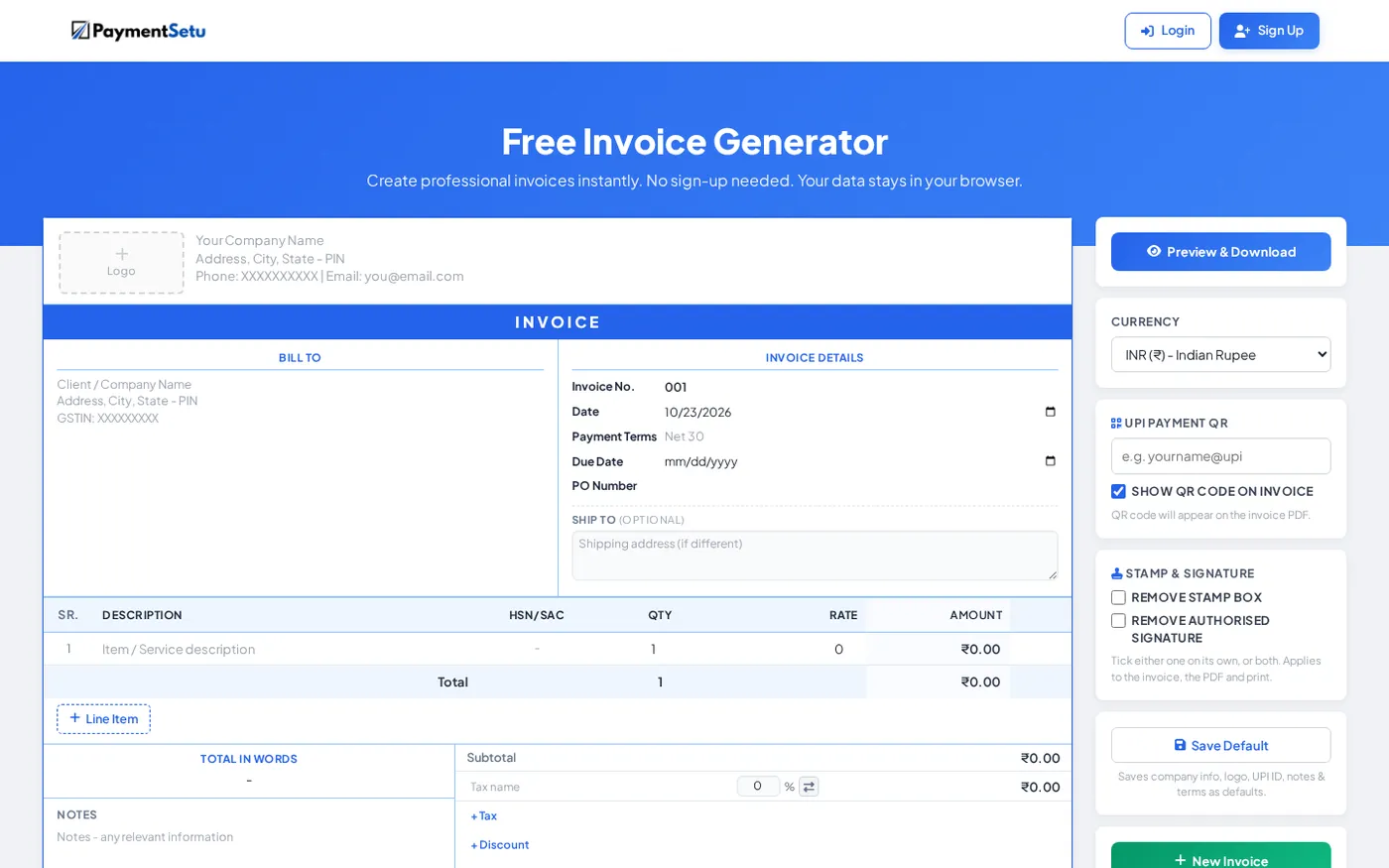
Handwriting is workable for occasional counter sales, but repeated invoices create avoidable copying and calculation work. PaymentSetu’s free invoice generator lets you enter the invoice details in a browser and download a PDF with an embedded UPI QR. It includes fields for HSN/SAC, tax, discount and shipping, and the tool is available without sign-up; the site says the data stays in the browser.
The workflow is simple:
- Enter your business and customer details.
- Add each good or service, HSN/SAC, quantity, price, discount and tax.
- Review the taxable value, tax split and final total.
- Add your payment details so the invoice QR points to the intended UPI ID.
- Download the PDF, check the invoice number and required fields, and share or print it.
The QR is a payment convenience, not proof that a payment has been received. Check your merchant account or payment records before marking an invoice paid. If you only need a printable QR without invoice fields, use the free UPI QR code generator instead.
Verify before handing over the invoice
Use this final one-minute check:
- Is the document labelled correctly as a tax invoice or bill of supply?
- Are supplier name, address and GSTIN correct?
- Is the invoice number unique and in sequence for the financial year?
- Are the date, customer details and HSN or accounting code present?
- Do description, quantity, taxable value, tax rate, tax amount and total agree?
- Are place of supply, delivery address and reverse-charge details included when applicable?
- Is the supplier signature present?
- If there is a UPI QR, does it show the intended payee and amount before the customer pays?
Keep the completed copy with your sales records and give the customer their copy. For a transaction with unusual place-of-supply, tax, export, reverse-charge or e-invoicing details, get professional advice before issuing it.
FAQ
Is a handwritten GST invoice valid in India?
A handwritten invoice may be valid when it is issued by the appropriate registered supplier and contains the applicable particulars required by the GST invoice rules. The rules focus on the invoice information and transaction conditions, so do not assume that handwriting alone makes a document valid or invalid.
What is the format of a handwritten GST bill?
There is no single visual design in the Rule 46 checklist. Your format should leave space for supplier and recipient details, a unique invoice number, date, HSN or accounting code, description, values, tax rate and amount, applicable place-of-supply details, reverse-charge status and signature.
Can I write a GST invoice in a bill book?
Yes, a bill book can be used as the paper format when it captures the required fields and your business follows the applicable invoice process. Check that the book supports consecutive financial-year numbering, tax details and the recipient information required for the transaction.
Is GSTIN mandatory on a handwritten invoice?
The supplier’s GSTIN is a required field on a tax invoice issued by a registered person. Add the recipient’s GSTIN or UIN when the recipient is registered, and do not use a GST tax invoice to charge GST if you are not registered.
Can I add a UPI QR to a GST invoice?
You can print a UPI QR as a payment option on an invoice, provided it points to the correct payee details. The QR does not replace the GST fields, the supplier’s signature or any separate invoice requirement, and a scan or payment screenshot is not by itself proof that the payment has settled.