UPI payment integration in Python becomes much easier when you separate order creation, the customer’s UPI payment and server-side verification. This guide shows a requests-based flow for Django and Flask using PaymentSetu, with dynamic QR orders, HMAC-signed webhooks and a safe status-check fallback.
What you need
PaymentSetu is a payment verification service, not a payment gateway. The customer pays directly into your connected Paytm Business or PhonePe Business merchant account; PaymentSetu matches the amount and UTR to your order and notifies your application.
Prepare these items before writing the first view:
- A Python application using Django or Flask, with a database record for each order.
- A public HTTPS URL for your webhook, such as
https://shop.example.com/webhooks/paymentsetu. - A PaymentSetu account with an API key, webhook secret and a connected merchant account.
- A stable order reference generated by your application. Send it as
client_txn_idand save it before creating the QR. - A server-side environment for secrets. Do not put the API key or webhook secret in browser JavaScript, templates or a mobile app.
Install the HTTP client and the framework packages in your virtual environment:
python -m venv .venv
source .venv/bin/activate
python -m pip install requests django flask
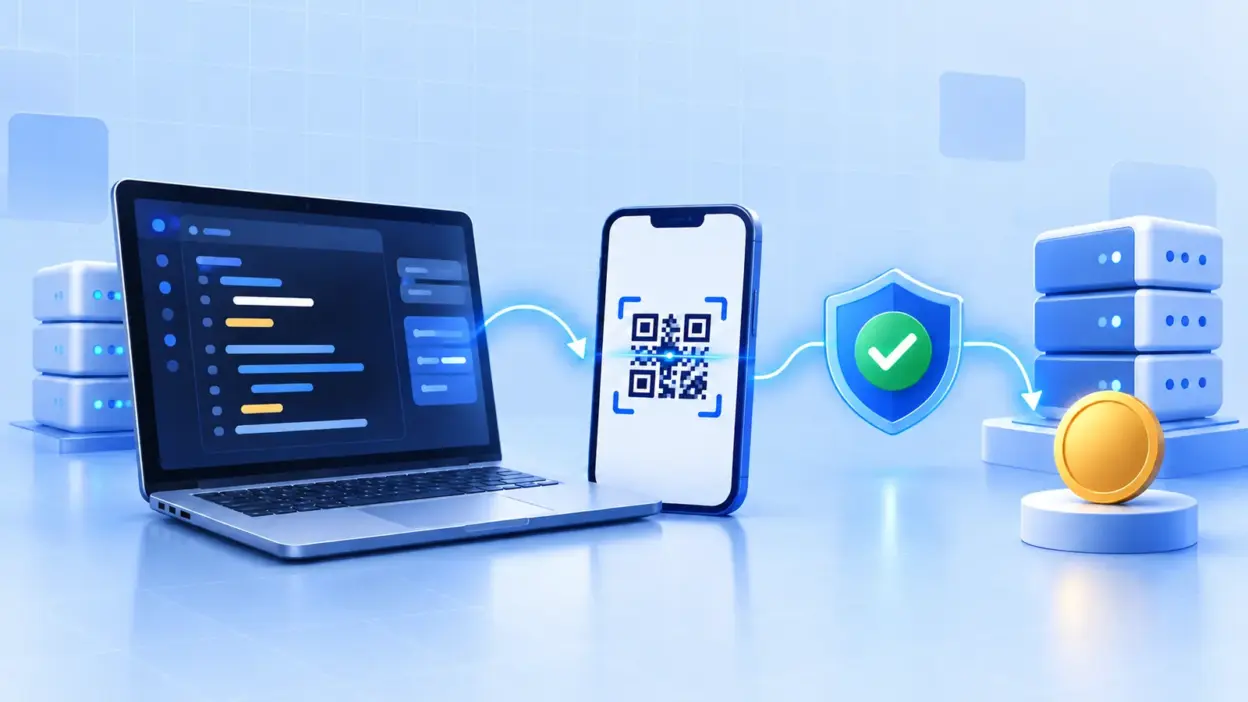
The integration has five parts:
- Your server creates an order with
POST /api/create_order. - Your checkout displays the QR or payment details returned by the API.
- The customer pays by UPI into your own merchant account.
- PaymentSetu matches the payment and sends an HMAC-signed webhook.
- Your application marks the order paid once, then uses
GET /api/order_status/{client_txn_id}when it needs to check again.
For a WooCommerce store, the ready-made PaymentSetu WooCommerce plugin can handle the same payment-verification flow without custom API work. Use the Python route when your checkout or billing system is your own application.
Step 1: Model your order and secrets
Why this matters: the webhook must map an external payment to one internal order, and your application must be able to ignore a repeated delivery safely.
Create an order row before calling the API. At minimum, keep your internal order ID, client_txn_id, expected amount, current status and the eventual UTR. Make client_txn_id unique in the database.
Set environment variables on the server, for example:
export PAYMENTSETU_API_BASE="https://your-paymentsetu-api-host"
export PAYMENTSETU_API_KEY="replace-with-your-api-key"
export PAYMENTSETU_WEBHOOK_SECRET="replace-with-your-webhook-secret"
export PAYMENTSETU_API_KEY_HEADER="X-API-Key"
export PAYMENTSETU_SIGNATURE_HEADER="X-PaymentSetu-Signature"
export PAYMENTSETU_SIGNATURE_DIGEST="sha256"
The API is API-key authenticated and the webhook is HMAC-signed. The two header names and the digest encoding above are configuration examples: copy the exact names and algorithm from the API instructions shown in your PaymentSetu account. Keeping them in environment variables lets you follow that contract without changing application code.
Do not log PAYMENTSETU_API_KEY, PAYMENTSETU_WEBHOOK_SECRET or the complete webhook body if it contains personal data. Log a request ID, your client_txn_id and the result of processing instead.
Success looks like this: your database can find one pending order by client_txn_id, and the process running Django or Flask can read the five environment variables without exposing them to the browser.
Step 2: Create an order with requests
Why this matters: the order reference is the link between your checkout, the dynamic QR and the verification callback.
Keep this call on your server. The browser should ask your application to create an order; it should never receive your API key.
import os
from urllib.parse import quote

import requests


API_BASE = os.environ["PAYMENTSETU_API_BASE"].rstrip("/")
API_KEY = os.environ["PAYMENTSETU_API_KEY"]
API_KEY_HEADER = os.getenv("PAYMENTSETU_API_KEY_HEADER", "X-API-Key")


def api_headers():
    return {
        "Accept": "application/json",
        "Content-Type": "application/json",
        API_KEY_HEADER: API_KEY,
    }


def create_payment_order(client_txn_id, amount_inr, webhook_url):
    payload = {
        "client_txn_id": client_txn_id,
        "amount": str(amount_inr),
        "webhook_url": webhook_url,
    }

    response = requests.post(
        f"{API_BASE}/api/create_order",
        headers=api_headers(),
        json=payload,
        timeout=15,
    )
    response.raise_for_status()
    return response.json()


def get_payment_status(client_txn_id):
    safe_id = quote(client_txn_id, safe="")
    response = requests.get(
        f"{API_BASE}/api/order_status/{safe_id}",
        headers=api_headers(),
        timeout=15,
    )
    response.raise_for_status()
    return response.json()
Call create_payment_order after inserting your pending order. A normal checkout service method might look like this:
from uuid import uuid4


def start_checkout(cart_total):
    client_txn_id = f"ORDER-{uuid4().hex}"
    # Save this row before the network call in your real application.
    save_pending_order(client_txn_id, amount=cart_total)

    return create_payment_order(
        client_txn_id=client_txn_id,
        amount_inr=cart_total,
        webhook_url="https://shop.example.com/webhooks/paymentsetu",
    )
Read the returned JSON and pass only the QR/payment fields your frontend needs to the checkout page. Do not mark the order paid from a browser redirect, a customer screenshot or an unverified field supplied by the browser. The paid transition belongs in the webhook handler after signature, reference and amount checks.
Success looks like this: a pending order has a unique client_txn_id, the API returns a successful JSON response, and the page can render the returned dynamic QR or payment instructions.
Step 3: Add the Django webhook view
Why this matters: Django’s CSRF middleware is designed for browser forms, while a server-to-server webhook normally cannot send your site’s CSRF token. Exempt only this dedicated callback URL, then protect it with the webhook signature and your own idempotency checks. See Django’s CSRF guidance before applying the exemption.
Verify the raw request bytes before parsing JSON. The sample uses SHA-256 and a hex signature as a configurable example; the values must match the PaymentSetu webhook contract for your account.
import hashlib
import hmac
import json
import os

from django.db import transaction
from django.http import HttpResponse, JsonResponse
from django.views.decorators.csrf import csrf_exempt

from .models import Order


WEBHOOK_SECRET = os.environ["PAYMENTSETU_WEBHOOK_SECRET"].encode("utf-8")
SIGNATURE_HEADER = os.getenv(
    "PAYMENTSETU_SIGNATURE_HEADER", "X-PaymentSetu-Signature"
)
SUCCESS_VALUE = os.getenv("PAYMENTSETU_SUCCESS_VALUE", "success").lower()


def valid_signature(raw_body, received_signature):
    if not received_signature:
        return False

    expected = hmac.new(
        WEBHOOK_SECRET,
        raw_body,
        hashlib.sha256,
    ).hexdigest()
    return hmac.compare_digest(expected, received_signature.strip())


@csrf_exempt
def paymentsetu_webhook(request):
    if request.method != "POST":
        return HttpResponse(status=405)

    raw_body = request.body
    signature = request.headers.get(SIGNATURE_HEADER)
    if not valid_signature(raw_body, signature):
        return JsonResponse({"ok": False, "error": "invalid signature"}, status=401)

    try:
        event = json.loads(raw_body)
    except json.JSONDecodeError:
        return JsonResponse({"ok": False, "error": "invalid JSON"}, status=400)

    client_txn_id = event.get("client_txn_id")
    status = str(event.get("status", "")).lower()
    if not client_txn_id:
        return JsonResponse({"ok": False, "error": "missing order reference"}, status=400)

    with transaction.atomic():
        order = (
            Order.objects.select_for_update()
            .get(client_txn_id=client_txn_id)
        )

        # A retry for an already-paid order must not fulfil it twice.
        if order.status == Order.Status.PAID:
            return JsonResponse({"ok": True})

        if status != SUCCESS_VALUE:
            return JsonResponse({"ok": True})

        received_amount = str(event.get("amount", ""))
        if received_amount != str(order.amount):
            return JsonResponse({"ok": False, "error": "amount mismatch"}, status=400)

        order.status = Order.Status.PAID
        order.utr = event.get("utr", "")
        order.save(update_fields=["status", "utr", "updated_at"])

        enqueue_fulfilment(order.pk)

    return JsonResponse({"ok": True})
Replace Order, enqueue_fulfilment and the field names with your application’s code. Also confirm the exact webhook payload keys and success value in your PaymentSetu API instructions. The important order is fixed: read raw bytes, validate HMAC, parse JSON, find the unique order, compare the amount, then perform one atomic paid transition.
Register the URL:
from django.urls import path

from .views import paymentsetu_webhook


urlpatterns = [
    path("webhooks/paymentsetu", paymentsetu_webhook, name="paymentsetu-webhook"),
]
Python’s hmac.compare_digest is intended for comparing secret-derived values without ordinary content-based short-circuiting. Do not replace it with a casual expected == received comparison in production code.
Success looks like this: a valid signed POST returns HTTP 200, an invalid signature returns HTTP 401, and sending the same valid event twice leaves one paid order and one fulfilment.
Step 4: Add the Flask webhook route
Why this matters: Flask can expose the same verification flow with a small route. Keep the raw body for HMAC validation, then call get_json() only after the signature passes. Flask documents request.get_json() and JSON responses in its request API.
import hashlib
import hmac
import os

from flask import Flask, jsonify, request

app = Flask(__name__)

WEBHOOK_SECRET = os.environ["PAYMENTSETU_WEBHOOK_SECRET"].encode("utf-8")
SIGNATURE_HEADER = os.getenv(
    "PAYMENTSETU_SIGNATURE_HEADER", "X-PaymentSetu-Signature"
)
SUCCESS_VALUE = os.getenv("PAYMENTSETU_SUCCESS_VALUE", "success").lower()


def valid_signature(raw_body, received_signature):
    if not received_signature:
        return False

    expected = hmac.new(
        WEBHOOK_SECRET,
        raw_body,
        hashlib.sha256,
    ).hexdigest()
    return hmac.compare_digest(expected, received_signature.strip())


@app.post("/webhooks/paymentsetu")
def paymentsetu_webhook():
    raw_body = request.get_data(cache=True)
    signature = request.headers.get(SIGNATURE_HEADER)

    if not valid_signature(raw_body, signature):
        return jsonify(ok=False, error="invalid signature"), 401

    event = request.get_json(silent=True)
    if not isinstance(event, dict):
        return jsonify(ok=False, error="invalid JSON"), 400

    client_txn_id = event.get("client_txn_id")
    if not client_txn_id:
        return jsonify(ok=False, error="missing order reference"), 400

    with database.transaction():
        order = database.lock_order(client_txn_id)

        if order.status == "paid":
            return jsonify(ok=True)

        if str(event.get("status", "")).lower() != SUCCESS_VALUE:
            return jsonify(ok=True)

        if str(event.get("amount", "")) != str(order.amount):
            return jsonify(ok=False, error="amount mismatch"), 400

        database.mark_paid(
            order,
            utr=event.get("utr", ""),
        )
        database.enqueue_fulfilment(order.id)

return jsonify(ok=True)database.lock_order, mark_paid and enqueue_fulfilment are application-specific placeholders. Implement the lock or unique event constraint with your database library. A webhook handler should do the minimum durable work needed to record the payment, then queue email, stock, access or invoice actions so a slow downstream service does not hold the callback open.
Success looks like this: Flask accepts only POST, rejects malformed or unsigned requests, returns a 2xx response for a valid event, and keeps a replay of the event harmless.
Step 5: Show the QR and keep the browser out of verification
Why this matters: the customer experience can be browser-based, but the decision that an order is paid must be server-side.
After create_payment_order returns, store the response needed to redraw the checkout and show the QR. Keep the browser polling your own endpoint, such as /orders/ORDER-123/status; do not expose the PaymentSetu API key or call the external API directly from JavaScript.
Your own status endpoint can read the database first:
def checkout_status(client_txn_id):
    order = load_order_for_current_customer(client_txn_id)
    return {
        "client_txn_id": order.client_txn_id,
        "status": order.status,
    }
The normal path is webhook-first. If the order remains pending, your server can call GET /api/order_status/{client_txn_id} using the get_payment_status function from Step 2. Use a modest retry schedule or a staff “check status” action; do not make a tight loop that repeatedly calls the API.
Keep these records for reconciliation:
| Record | Why you keep it |
|---|---|
client_txn_id | Maps PaymentSetu’s event to your internal order |
| Expected amount | Detects a callback that does not match the order |
| Verified amount | Provides the received value for your receipt record |
| UTR | Gives your finance team a bank-reference field |
| Webhook event ID, if supplied | Makes replay protection explicit |
| Received timestamp | Helps reconcile the day’s verified payments |
PaymentSetu sends money directly to your own connected merchant account and charges 0% commission on the payment. The Pro plan is ₹999 per 30 days for 1,000 credits, with one credit representing one successful payment verified; check the current plan details when choosing capacity.
Success looks like this: the checkout displays a QR, the frontend sees a pending order until your backend records the signed event, and a status check can reconcile an order without trusting a screenshot.
Step 6: Test the integration before going live
Why this matters: most payment-integration bugs are contract or state-transition bugs, not Python syntax errors. Test both the happy path and the security boundaries.
First run a local syntax check and your application’s tests:
python -m compileall paymentsetu_client.py
python manage.py check        # Django only
pytest                        # if your project uses pytest
Then test these cases with a safe test order or the test procedure available in your PaymentSetu account:
- Create one order and confirm that its
client_txn_idand amount are saved before the QR is shown. - Pay the exact amount and confirm that the webhook is accepted and the order becomes paid.
- Send the same signed body twice. Confirm that only one fulfilment job, email or access grant is created.
- Change one byte of the body without changing the signature. Confirm HTTP 401.
- Use a wrong signature with an otherwise valid body. Confirm HTTP 401.
- Change the amount in a signed body. Confirm the event is not applied to the order.
- Call the status endpoint for a pending and a paid order. Confirm your application maps both responses without exposing API credentials.
- Call
GET /api/check_creditsfrom the server when you need to display or monitor remaining credits.
For a local signature unit test, calculate the expected digest from the exact raw bytes. Do not parse and re-serialise JSON before checking the signature, because whitespace and key order can change the bytes.
def test_signature_round_trip():
    body = b'{"client_txn_id":"ORDER-123","status":"success"}'
    secret = b"local-test-secret"
    signature = hmac.new(secret, body, hashlib.sha256).hexdigest()
    assert valid_signature(body, signature)
    assert not valid_signature(body + b" ", signature)
Before production, configure the webhook URL as HTTPS, set the exact header and digest settings from your account, restrict the callback to POST, and make the order transition atomic. Never treat a customer-uploaded payment screenshot as confirmation.
Troubleshooting Python UPI integrations
The create-order call returns an authentication error. Confirm that the key is present only on the server, that the API-key header name matches the account instructions, and that the base URL does not contain a duplicated /api path. Log the HTTP status and a request ID, not the key.
The QR is displayed but the order stays pending. Check that the webhook URL is public HTTPS, the callback route accepts POST, and the saved client_txn_id is the same value sent during order creation. Use the server-side status endpoint to inspect the order rather than relying on a browser redirect.
Every webhook is rejected. Compare the signature header name, digest algorithm, encoding and secret. Compute the HMAC over the raw body bytes before json.loads() or request.get_json() and remove any accidental Bearer or sha256= prefix only if the PaymentSetu signature format requires it.
The same order is fulfilled twice. Add a database lock or unique event record, and make the paid transition conditional. A repeated event should return success after the first durable transition without sending another email, granting access or shipping another item.
A valid event gives an amount mismatch. Store amounts in a consistent representation, preferably integer paise or a fixed-precision decimal. Compare the verified value with the order’s expected amount before marking the order paid, and do not silently round a mismatch.
FAQ
Can I integrate UPI payments in Python without a gateway SDK?
Yes. A Python application can use HTTPS requests to create an order, render the returned QR/payment details and receive the HMAC-signed verification webhook. This guide uses the framework-agnostic requests library, so the same client code can be shared by Django, Flask or another Python server.
Is PaymentSetu a payment gateway?
No. PaymentSetu is a payment verification service. The customer pays directly to your connected Paytm Business or PhonePe Business merchant account, PaymentSetu matches the UTR and amount to your order and your application receives the webhook.
Should Django exempt the webhook from CSRF?
A server-to-server webhook normally cannot supply the CSRF token used by your customer-facing forms, so a dedicated callback can use csrf_exempt. Compensate with HTTPS, HMAC verification, strict POST handling, idempotency and amount/reference checks; never exempt an entire application or skip signature validation.
What should a Python webhook do when the same event arrives again?
Return a successful response after confirming that the order is already paid, without repeating fulfilment. Store a unique transaction or event reference and use an atomic database transition so retries remain harmless.
Which PaymentSetu plan fits a growing Python checkout?
PaymentSetu Pro is ₹999 per 30 days for 1,000 verified payments and includes API access, webhooks, dynamic QR and priority support. Choose the plan by expected successful payment count: Starter is ₹399 for 100 credits, while Business is ₹1,499 for 100,000 credits.
DONE upi-payment-integration-python-django words=2016